



Now vibe coding, so learning hammer FE ?
tailwind css 官方出的排序插件由于 prettier 更新导致报错的问题被修复了
https://github.com/tailwindlabs/prettier-plugin-tailwindcss/releases/tag/v0.7.2
https://github.com/tailwindlabs/prettier-plugin-tailwindcss/releases/tag/v0.7.2
文章《Automated Accessibility Testing for React》提出:自动化无法取代人工,但能提前拦截常见无障碍缺陷。最低成本方案是给所有 React 项目加装 eslint-plugin-jsx-a11y;若已用 React Testing Library,坚持语义查询即可同步做单元层检测。E2E 层推荐在 Cypress/Playwright 中插入 axe-core(cypress-axe 或 @axe-core/playwright),Storybook 用户可一键启用 addon-a11y。部署后可用 Lighthouse CI 或 pa11y 扫描整站。作者强调仍须键盘-only 走查与真机屏幕阅读器测试作最终兜底。
https://howtotestfrontend.com/resources/accessibility-testing-your-react-app
https://howtotestfrontend.com/resources/accessibility-testing-your-react-app
文章通过实战项目的方式,详细讲解了如何结合 React Three Fiber 和 GLSL 着色器实现一个视觉效果丰富、可扩展的无限滚动轮播组件。作者鼓励读者在此基础上继续探索,创造更多有趣的交互效果。
https://tympanus.net/codrops/2025/11/26/creating-wavy-infinite-carousels-in-react-three-fiber-with-glsl-shaders/
https://tympanus.net/codrops/2025/11/26/creating-wavy-infinite-carousels-in-react-three-fiber-with-glsl-shaders/

ToyFight® 为 INK Games 打造全新网站,采用 Next.js + React Three Fiber 单画布架构,通过 GSAP 与视口裁剪技术在同页流畅渲染多段 3D 内容,并借助遮罩、裁剪平面与光标联动旋转,实现门户卡片等复杂 3D 交互,兼顾性能与视觉冲击。
https://tympanus.net/codrops/2025/11/21/one-canvas-to-rule-them-all-how-ink-games-new-site-handles-complex-3d/
https://tympanus.net/codrops/2025/11/21/one-canvas-to-rule-them-all-how-ink-games-new-site-handles-complex-3d/
https://tympanus.net/codrops/2025/11/19/how-to-build-cinematic-3d-scroll-experiences-with-gsap/
如何用 GSAP 和 Three.js 做很卷的 3D 滚动动画
如何用 GSAP 和 Three.js 做很卷的 3D 滚动动画



#React 为修正路由匹配的正确性,TanStack Router 改用段前缀树结构,意外带来最高 2 万倍的性能飞跃。
https://tanstack.com/blog/tanstack-router-route-matching-tree-rewrite
https://tanstack.com/blog/tanstack-router-route-matching-tree-rewrite

#CSS 本文深入解析了 CSS
position: sticky 的常见“坑”:粘性元素不能大于滚动容器,也不能被尺寸过小的祖先块限制,尤其在 Flex/Grid 布局中默认的 stretch 对齐会让粘性失效;解决办法是给相关元素设置 align-self: flex-start 或限制高度并内部滚动,确保粘性元素在规范允许的包含块内自由“粘贴”。 https://frontendmasters.com/blog/the-weird-parts-of-position-sticky/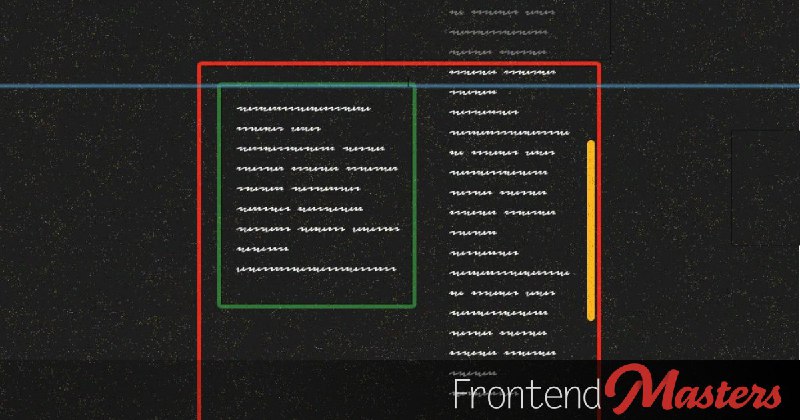
#CSS CSS 性能榜:只动
https://motion.dev/blog/web-animation-performance-tier-list
transform/opacity+transition/animation 或 WAAPI 最丝滑,别碰会触发 Layout 的几何属性与 setInterval 改样式。https://motion.dev/blog/web-animation-performance-tier-list

#React React 19 错误边界在捕获首个错误后立即停止渲染同级组件,避免资源浪费。
同时消除重复错误日志,简化开发者对异常的处理逻辑。
https://andrei-calazans.com/posts/react-19-error-boundary-changed/
同时消除重复错误日志,简化开发者对异常的处理逻辑。
https://andrei-calazans.com/posts/react-19-error-boundary-changed/
vscode 内联建议开源(Inline suggestions are open source):继开源 GitHub Copilot Chat 之后,VS Code 现在也开源了内联建议,将其合并到了 vscode-copilot-chat 仓库中。同时,GitHub Copilot 扩展和 GitHub Copilot Chat 扩展将整合为一个单一的扩展体验,聊天扩展现在提供所有内联建议,同时保留了聊天和代理功能。
#文章 这是一条关于 tanstack start 中间件的文章。
https://frontendmasters.com/blog/introducing-tanstack-start-middleware/
https://frontendmasters.com/blog/introducing-tanstack-start-middleware/
#TS typescript-plugin-directives: 一个 TypeScript 语言服务插件,为诸如 "use server" 、 "use client" 、 "use cache" 等 "use …" 指令提供 IDE 级别的感知功能。
https://github.com/lazarv/typescript-plugin-directives
https://github.com/lazarv/typescript-plugin-directives
#文章 利用 ES2022 的
- 错误链非枚举,不污染日志;可逐层访问 `err.cause` 获取完整堆栈与类型。
- 自定义错误类只需
- 使用场景
- 多层架构(服务→服务、包装函数、微调用)中,顶层抛出的同时需要追踪根因。
- 数据库/网络异常被重新包装为业务错误(如
- 单元测试断言:`expect(err.cause).toBeInstanceOf(原始错误类)`。
- 最佳实践
- 只在关键上下文加链,避免过度包装导致调试噪音。
- 手动记录:`console.error(err)
- 保持错误类型清晰,自定义类命名语义化,方便日志与监控筛选。
https://allthingssmitty.com/2025/11/10/error-chaining-in-javascript-cleaner-debugging-with-error-cause/
Error.cause 在构造函数中保留原始错误:`new Error(msg, { cause: err })`。- 错误链非枚举,不污染日志;可逐层访问 `err.cause` 获取完整堆栈与类型。
- 自定义错误类只需
super(message, { cause }) 即可自动继承该能力;TypeScript 需 `target/lib ≥ es2022`。- 使用场景
- 多层架构(服务→服务、包装函数、微调用)中,顶层抛出的同时需要追踪根因。
- 数据库/网络异常被重新包装为业务错误(如
ConnectionTimeoutError → DatabaseError → `ServiceUnavailableError`)。- 单元测试断言:`expect(err.cause).toBeInstanceOf(原始错误类)`。
- 最佳实践
- 只在关键上下文加链,避免过度包装导致调试噪音。
- 手动记录:`console.error(err)
后紧跟 `console.error('Caused by:', err.cause)`;使用递归辅助函数 `logErrorChain/logFullErrorChain 打印完整链。- 保持错误类型清晰,自定义类命名语义化,方便日志与监控筛选。
https://allthingssmitty.com/2025/11/10/error-chaining-in-javascript-cleaner-debugging-with-error-cause/
